> ## Documentation Index
> Fetch the complete documentation index at: https://docs.gladia.io/llms.txt
> Use this file to discover all available pages before exploring further.
# Quickstart
> How to transcribe pre-recorded audio with Gladia's speech-to-text (STT) API
The SDK simplifies pre-recorded speech-to-text by abstracting upload, job creation, and result retrieval. Designed for developers, it offers:
* A `transcribe()` for an end-to-end flow
* Individual steps when you need control over each step.
Pass `model` to choose the transcription model:
**`"solaria-3"`** — our latest model: highest accuracy on European real-world audio.
* **Async (pre-recorded) only** — not available for live transcription.
* **Languages:** English, French, German, Spanish, Italian
* **Single language only** — pass exactly one language in `language_config.languages` (no code switching).
* All Audio Intelligence add-ons available.
**`"solaria-1"`** — our generalist model: maximum language coverage across any domain.
* Available for async and live.
* Code switching and multi-language configuration (100+ languages covered)
* All Audio Intelligence add-ons available.
If omitted, the API uses the default model. (Solaria-1)
## Install the SDK
```sh JavaScript theme={"system"}
npm install @gladiaio/sdk
```
```sh Python theme={"system"}
# Using pip
pip install gladiaio-sdk
# Using uv
uv add gladiaio-sdk
```
## Transcribe in one call
End-to-end transcription — from upload to result in one call.
Pass in a local file, binary data, or a remote URL — and let the method handle the rest.
```javascript JavaScript theme={"system"}
import { GladiaClient } from "@gladiaio/sdk";
const gladiaClient = new GladiaClient({ apiKey: "YOUR_GLADIA_API_KEY" });
const transcription = await gladiaClient
.preRecorded()
.transcribe("YOUR_AUDIO_URL_OR_LOCAL_PATH");
```
```python Python theme={"system"}
from gladiaio_sdk import GladiaClient
gladia_client = GladiaClient(api_key="YOUR_GLADIA_API_KEY").prerecorded()
transcription = gladia_client.transcribe("YOUR_AUDIO_URL_OR_LOCAL_PATH")
```
With customizable features:
```javascript JavaScript theme={"system"}
import { GladiaClient } from "@gladiaio/sdk";
const gladiaClient = new GladiaClient({ apiKey: "YOUR_GLADIA_API_KEY" });
const transcription = await gladiaClient.preRecorded().transcribe(
"YOUR_AUDIO_URL_OR_LOCAL_PATH",
{
model: "solaria-3",
language_config: {
languages: ["fr"],
},
custom_vocabulary: true,
custom_vocabulary_config: {
vocabulary: ["Gladia", "Solaria", "Salesforce"],
},
}
);
```
```python Python theme={"system"}
from gladiaio_sdk import GladiaClient
gladia_client = GladiaClient(api_key="YOUR_GLADIA_API_KEY").prerecorded()
transcription = gladia_client.transcribe(
"YOUR_AUDIO_URL_OR_LOCAL_PATH",
{
"model": "solaria-3",
"language_config": {
"languages": ["fr"],
},
"custom_vocabulary": True,
"custom_vocabulary_config": {
"vocabulary": ["Gladia", "Solaria", "Salesforce"],
},
},
)
```
With `"solaria-3"`, set **one language** in `language_config.languages` — for example `["fr"]`. Do not pass multiple languages or enable code switching.
Want to go further? See [Audio Intelligence](/chapters/pre-recorded-stt/audio-intelligence) for add-ons like:
* [Speaker diarization](/chapters/audio-intelligence/speaker-diarization): separate the speakers across the conversation
* [Translation](/chapters/audio-intelligence/translation): translate the transcript into one of our 100 target languages.
* [PII redaction](/chapters/audio-intelligence/pii-redaction): detect and anonymize sensitive entities (ex: GDPR-related)
* [Sentiment analysis](/chapters/audio-intelligence/sentiment-analysis): extract the main sentiment and up to 25 emotions
## Individual steps
The building blocks behind `transcribe()` — upload audio, create a job, then retrieve the result when you need finer control over the flow.
### Upload your audio
Upload a local file and pass the returned `audio_url` to the next step.
```javascript JavaScript theme={"system"}
import { GladiaClient } from "@gladiaio/sdk";
const gladiaClient = new GladiaClient({ apiKey: "YOUR_GLADIA_API_KEY" });
const uploadResponse = await gladiaClient.preRecorded().uploadFile("YOUR_LOCAL_PATH");
```
```python Python theme={"system"}
from gladiaio_sdk import GladiaClient
gladia_client = GladiaClient(api_key="YOUR_GLADIA_API_KEY").prerecorded()
upload_response = gladia_client.upload_file("YOUR_LOCAL_PATH")
```
Example response:
```json theme={"system"}
{
"audio_url": "https://api.gladia.io/file/636c70f6-92c1-4026-a8b6-0dfe3ecf826f",
"audio_metadata": {
"id": "636c70f6-92c1-4026-a8b6-0dfe3ecf826f",
"filename": "your_audio_file.mp3",
"extension": "mp3",
"size": 99515383,
"audio_duration": 4146.468542,
"number_of_channels": 2
}
}
```
### Create a transcription job
Pass the `audio_url` from the previous step along with your transcription options.
```javascript JavaScript theme={"system"}
import { GladiaClient } from "@gladiaio/sdk";
const gladiaClient = new GladiaClient({ apiKey: "YOUR_GLADIA_API_KEY" });
const job = await gladiaClient.preRecorded().createUntyped({
audio_url: "YOUR_AUDIO_URL",
model: "solaria-3",
language_config: {
languages: ["fr"],
},
custom_vocabulary: true,
custom_vocabulary_config: {
vocabulary: ["Gladia", "Solaria", "Salesforce"],
},
});
```
```python Python theme={"system"}
from gladiaio_sdk import GladiaClient
gladia_client = GladiaClient(api_key="YOUR_GLADIA_API_KEY").prerecorded()
job = gladia_client.create(
{
"audio_url": "YOUR_AUDIO_URL",
"model": "solaria-3",
"language_config": {
"languages": ["fr"],
},
"custom_vocabulary": True,
"custom_vocabulary_config": {
"vocabulary": ["Gladia", "Solaria", "Salesforce"],
},
}
)
```
### Get the transcription result
You can get your transcription results in **3 different ways**:
```javascript JavaScript theme={"system"}
import { GladiaClient } from '@gladiaio/sdk';
const gladiaClient = new GladiaClient({
apiKey: 'YOUR_GLADIA_API_KEY',
});
// Use job.id from createUntyped(...)
const result = await gladiaClient.preRecorded().poll("YOUR_TRANSCRIPTION_JOB_ID");
console.log(result.result?.transcription?.full_transcript ?? "");
```
```python Python theme={"system"}
from gladiaio_sdk import GladiaClient
gladia_client = GladiaClient(api_key="YOUR_GLADIA_API_KEY").prerecorded()
# Use job.id from gladia_client.create(...)
result = gladia_client.poll("YOUR_TRANSCRIPTION_JOB_ID")
print(result.result.transcription.full_transcript)
```
You can use `create_and_poll()` in Python or `createAndPollUntyped()` in JavaScript to **create** and **poll** in one call with the same job payload.
The methods implemented in the sdk are automatically polling until success or errors.
To get the result with the cURL, you'll just have to GET continuously on the given `result_url` until the status
of your transcription is `done`.
You can get more information on the different transcriptions status by checking directly the [API Reference](/api-reference/).
You can configure webhooks at [https://app.gladia.io/webhooks](https://app.gladia.io/webhooks) to be notified when your transcriptions are done.
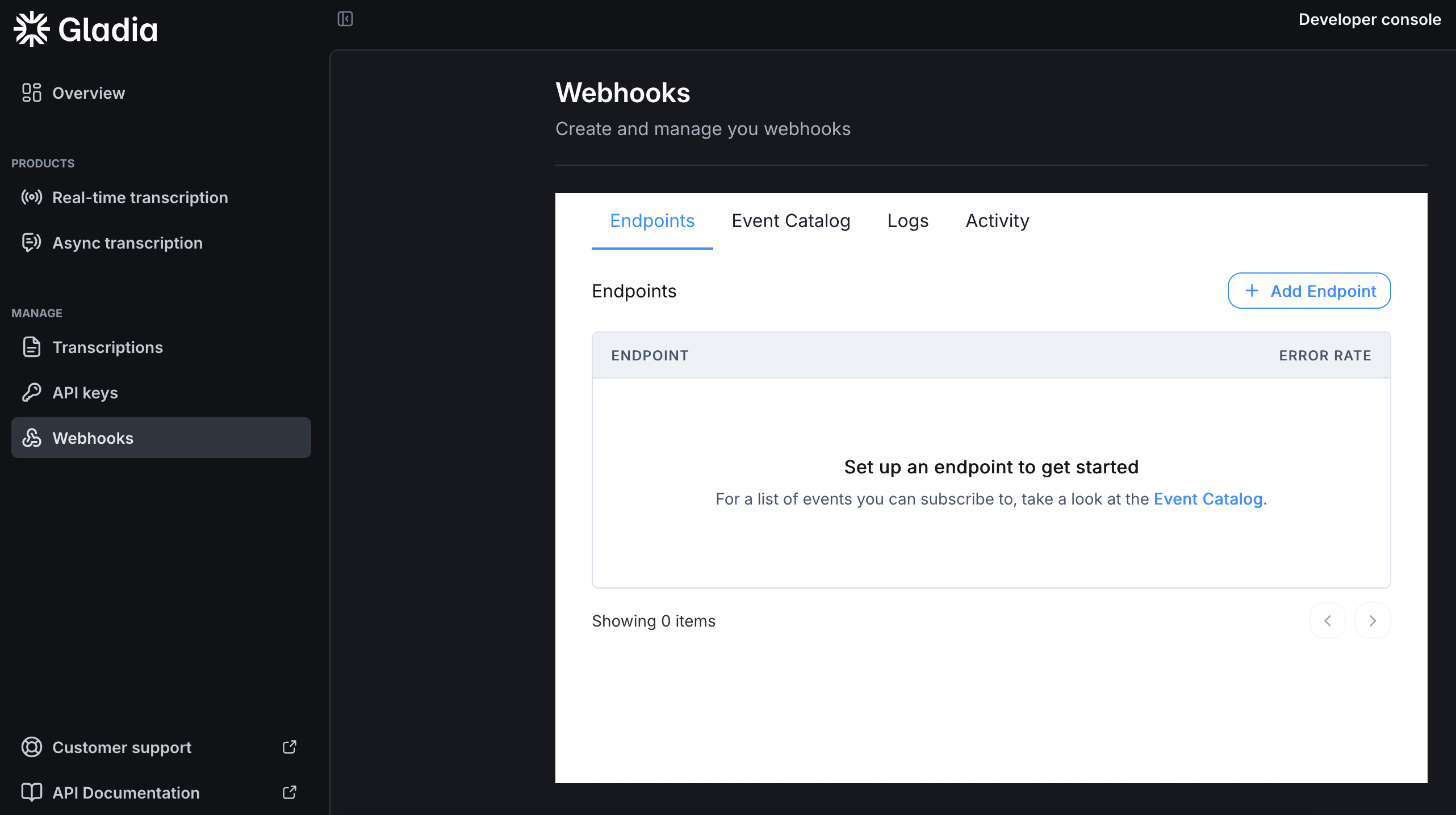 Once a transcription is done, a `POST` request will be made to the endpoint you configured. The request body is a JSON object containing the transcription `id` that you can use to retrieve your result with [our API](/api-reference/v2/pre-recorded/get).\
For the full body definition, check [our API definition](/api-reference/v2/pre-recorded/webhook/success).
Callback are HTTP calls that you can use to get notified when your transcripts are ready.
Instead of polling and keeping your server busy and maintaining work, you can use the `callback` feature to receive the result to a specified endpoint:
```json theme={"system"}
{
"audio_url": "YOUR_AUDIO_URL",
"callback": true,
"callback_config": {
"url": "https://yourserverurl.com/your/callback/endpoint/",
"method": "POST"
}
}
```
Once the transcription is done, a request will be made to the url you provided in `callback_config.url` using the HTTP method you provided in `callback_config.method`.
Allowed methods are `POST` and `PUT` with the default being `POST`.
The request body is a JSON object containing the transcription `id` and an `event` property that tells you if it's a [success](/api-reference/v2/pre-recorded/callback/success) or an [error](/api-reference/v2/pre-recorded/callback/error).
For file size, duration, and concurrency limits, see [Supported files & duration](/chapters/limits-and-specifications/supported-formats) and [Concurrency and rate limits](/chapters/limits-and-specifications/concurrency).
Pass `model` to choose the transcription model:
**`"solaria-3"`** — our latest model: highest accuracy on European real-world audio.
* **Async (pre-recorded) only** — not available for live transcription.
* **Languages:** English, French, German, Spanish, Italian
* **Single language only** — pass exactly one language in `language_config.languages` (no code switching).
* All Audio Intelligence add-ons available.
**`"solaria-1"`** — our generalist model: maximum language coverage across any domain.
* Available for async and live.
* Code switching and multi-language configuration (100+ languages covered)
* All Audio Intelligence add-ons available.
If omitted, the API uses the default model. (Solaria-1)
## Individual steps
Upload audio, create a transcription job, then poll until the job is done (or use webhooks or a callback URL).
### Upload your audio
Call the [upload endpoint](/api-reference/v2/upload/audio-file) with multipart form data. Use the returned `audio_url` when creating a transcription job.
```bash cURL theme={"system"}
curl --request POST \
--url https://api.gladia.io/v2/upload \
--header 'Content-Type: multipart/form-data' \
--header 'x-gladia-key: YOUR_GLADIA_API_KEY' \
--form audio=@/path/to/your/audio/your_audio_file.mp3
```
Example response:
```json theme={"system"}
{
"audio_url": "https://api.gladia.io/file/636c70f6-92c1-4026-a8b6-0dfe3ecf826f",
"audio_metadata": {
"id": "636c70f6-92c1-4026-a8b6-0dfe3ecf826f",
"filename": "your_audio_file.mp3",
"extension": "mp3",
"size": 99515383,
"audio_duration": 4146.468542,
"number_of_channels": 2
}
}
```
### Create a transcription job
POST to [`/v2/pre-recorded`](/api-reference/v2/pre-recorded/init) with your `audio_url` and options.
```javascript JavaScript theme={"system"}
const response = await fetch("https://api.gladia.io/v2/pre-recorded", {
method: "POST",
headers: {
"Content-Type": "application/json",
"x-gladia-key": "",
},
body: JSON.stringify({
audio_url: "YOUR_AUDIO_URL",
model: "solaria-3",
language_config: {
languages: ["fr"],
},
diarization: true,
diarization_config: {
number_of_speakers: 3,
min_speakers: 1,
max_speakers: 5,
},
translation: true,
translation_config: {
model: "base",
target_languages: ["fr", "en"],
context_adaptation: true,
context: "Business meeting discussing quarterly results",
informal: false,
},
subtitles: true,
subtitles_config: {
formats: ["srt", "vtt"],
},
}),
});
if (!response.ok) {
console.error(
`${response.status}: ${(await response.text()) || response.statusText}`
);
process.exit(response.status);
}
const { id, result_url } = await response.json();
```
```bash cURL theme={"system"}
curl --request POST \
--url https://api.gladia.io/v2/pre-recorded \
--header 'Content-Type: application/json' \
--header 'x-gladia-key: YOUR_GLADIA_API_KEY' \
--data '{
"audio_url": "YOUR_AUDIO_URL",
"model": "solaria-3",
"language_config": {
"languages": ["fr"]
},
"diarization": true,
"diarization_config": {
"number_of_speakers": 3,
"min_speakers": 1,
"max_speakers": 5
},
"translation": true,
"translation_config": {
"model": "base",
"target_languages": ["fr", "en"],
"context_adaptation": true,
"context": "Business meeting discussing quarterly results",
"informal": false
},
"subtitles": true,
"subtitles_config": {
"formats": ["srt", "vtt"]
}
}'
```
### Get the transcription result
Poll [`GET /v2/pre-recorded/:id`](/api-reference/v2/pre-recorded/get) (or the `result_url` from the create response) until the job status is `done`.
```javascript JavaScript theme={"system"}
const response = await fetch(
`https://api.gladia.io/v2/pre-recorded/${id}`,
{
method: "GET",
headers: {
"x-gladia-key": "",
},
}
);
if (!response.ok) {
console.error(
`${response.status}: ${(await response.text()) || response.statusText}`
);
return;
}
const result = await response.json();
console.log(result);
```
Instead of polling, configure [webhooks](https://app.gladia.io/webhooks) or set `callback` and `callback_config` on the job — see the [init](/api-reference/v2/pre-recorded/init) reference. The **Using our SDKs** tab also documents polling helpers, webhooks, and callbacks together.
Want to know more about a specific feature? Check out our [Features chapter](/chapters/pre-recorded-stt/features) for more details.
## Full code sample
You can find complete code samples in our Github repository:
{}
{}
{}
Once a transcription is done, a `POST` request will be made to the endpoint you configured. The request body is a JSON object containing the transcription `id` that you can use to retrieve your result with [our API](/api-reference/v2/pre-recorded/get).\
For the full body definition, check [our API definition](/api-reference/v2/pre-recorded/webhook/success).
Callback are HTTP calls that you can use to get notified when your transcripts are ready.
Instead of polling and keeping your server busy and maintaining work, you can use the `callback` feature to receive the result to a specified endpoint:
```json theme={"system"}
{
"audio_url": "YOUR_AUDIO_URL",
"callback": true,
"callback_config": {
"url": "https://yourserverurl.com/your/callback/endpoint/",
"method": "POST"
}
}
```
Once the transcription is done, a request will be made to the url you provided in `callback_config.url` using the HTTP method you provided in `callback_config.method`.
Allowed methods are `POST` and `PUT` with the default being `POST`.
The request body is a JSON object containing the transcription `id` and an `event` property that tells you if it's a [success](/api-reference/v2/pre-recorded/callback/success) or an [error](/api-reference/v2/pre-recorded/callback/error).
For file size, duration, and concurrency limits, see [Supported files & duration](/chapters/limits-and-specifications/supported-formats) and [Concurrency and rate limits](/chapters/limits-and-specifications/concurrency).
Pass `model` to choose the transcription model:
**`"solaria-3"`** — our latest model: highest accuracy on European real-world audio.
* **Async (pre-recorded) only** — not available for live transcription.
* **Languages:** English, French, German, Spanish, Italian
* **Single language only** — pass exactly one language in `language_config.languages` (no code switching).
* All Audio Intelligence add-ons available.
**`"solaria-1"`** — our generalist model: maximum language coverage across any domain.
* Available for async and live.
* Code switching and multi-language configuration (100+ languages covered)
* All Audio Intelligence add-ons available.
If omitted, the API uses the default model. (Solaria-1)
## Individual steps
Upload audio, create a transcription job, then poll until the job is done (or use webhooks or a callback URL).
### Upload your audio
Call the [upload endpoint](/api-reference/v2/upload/audio-file) with multipart form data. Use the returned `audio_url` when creating a transcription job.
```bash cURL theme={"system"}
curl --request POST \
--url https://api.gladia.io/v2/upload \
--header 'Content-Type: multipart/form-data' \
--header 'x-gladia-key: YOUR_GLADIA_API_KEY' \
--form audio=@/path/to/your/audio/your_audio_file.mp3
```
Example response:
```json theme={"system"}
{
"audio_url": "https://api.gladia.io/file/636c70f6-92c1-4026-a8b6-0dfe3ecf826f",
"audio_metadata": {
"id": "636c70f6-92c1-4026-a8b6-0dfe3ecf826f",
"filename": "your_audio_file.mp3",
"extension": "mp3",
"size": 99515383,
"audio_duration": 4146.468542,
"number_of_channels": 2
}
}
```
### Create a transcription job
POST to [`/v2/pre-recorded`](/api-reference/v2/pre-recorded/init) with your `audio_url` and options.
```javascript JavaScript theme={"system"}
const response = await fetch("https://api.gladia.io/v2/pre-recorded", {
method: "POST",
headers: {
"Content-Type": "application/json",
"x-gladia-key": "",
},
body: JSON.stringify({
audio_url: "YOUR_AUDIO_URL",
model: "solaria-3",
language_config: {
languages: ["fr"],
},
diarization: true,
diarization_config: {
number_of_speakers: 3,
min_speakers: 1,
max_speakers: 5,
},
translation: true,
translation_config: {
model: "base",
target_languages: ["fr", "en"],
context_adaptation: true,
context: "Business meeting discussing quarterly results",
informal: false,
},
subtitles: true,
subtitles_config: {
formats: ["srt", "vtt"],
},
}),
});
if (!response.ok) {
console.error(
`${response.status}: ${(await response.text()) || response.statusText}`
);
process.exit(response.status);
}
const { id, result_url } = await response.json();
```
```bash cURL theme={"system"}
curl --request POST \
--url https://api.gladia.io/v2/pre-recorded \
--header 'Content-Type: application/json' \
--header 'x-gladia-key: YOUR_GLADIA_API_KEY' \
--data '{
"audio_url": "YOUR_AUDIO_URL",
"model": "solaria-3",
"language_config": {
"languages": ["fr"]
},
"diarization": true,
"diarization_config": {
"number_of_speakers": 3,
"min_speakers": 1,
"max_speakers": 5
},
"translation": true,
"translation_config": {
"model": "base",
"target_languages": ["fr", "en"],
"context_adaptation": true,
"context": "Business meeting discussing quarterly results",
"informal": false
},
"subtitles": true,
"subtitles_config": {
"formats": ["srt", "vtt"]
}
}'
```
### Get the transcription result
Poll [`GET /v2/pre-recorded/:id`](/api-reference/v2/pre-recorded/get) (or the `result_url` from the create response) until the job status is `done`.
```javascript JavaScript theme={"system"}
const response = await fetch(
`https://api.gladia.io/v2/pre-recorded/${id}`,
{
method: "GET",
headers: {
"x-gladia-key": "",
},
}
);
if (!response.ok) {
console.error(
`${response.status}: ${(await response.text()) || response.statusText}`
);
return;
}
const result = await response.json();
console.log(result);
```
Instead of polling, configure [webhooks](https://app.gladia.io/webhooks) or set `callback` and `callback_config` on the job — see the [init](/api-reference/v2/pre-recorded/init) reference. The **Using our SDKs** tab also documents polling helpers, webhooks, and callbacks together.
Want to know more about a specific feature? Check out our [Features chapter](/chapters/pre-recorded-stt/features) for more details.
## Full code sample
You can find complete code samples in our Github repository:
{}
{}
{}