> ## Documentation Index
> Fetch the complete documentation index at: https://docs.gladia.io/llms.txt
> Use this file to discover all available pages before exploring further.
# Pre-recorded - Migration guide from V1 to V2
> Migrate to the latest version of Gladia's pre-recorded speech-to-text API
## General flow changes
In the first version of Gladia API, to get your transcription through an HTTP call, you had to send everything
(audio file/url, parameters, etc) in a single HTTP call, and then keep the connection open until you get your result.
This was not ideal for many scenarios that could lead to longer waiting time to get your results, or in case of connection
errors, not getting your results at all despite the transcription being successful.
In V2, we addressed this by decomposing the process in multiple steps, and have merged both audio & video endpoints:
This step is **optional** if you are already working with **audio URLs**.
If you're working with audio or video files, you'll need to upload it first using our `/upload` endpoint with `multipart/form-data`
content-type since Gladia `/v2/pre-recorded` endpoint only accept audio URLs now.
More information about this step [in the API Reference](/api-reference/v2/upload/audio-file)
```bash theme={"system"}
curl --request POST \
--url https://api.gladia.io/v2/upload \
--header 'Content-Type: multipart/form-data' \
--header 'x-gladia-key: YOUR_GLADIA_API_TOKEN' \
--form audio=@/path/to/your/audio/conversation.wav
```
Example response :
```json theme={"system"}
{
"audio_url": "https://api.gladia.io/file/636c70f6-92c1-4026-a8b6-0dfe3ecf826f",
"audio_metadata": {
"id": "636c70f6-92c1-4026-a8b6-0dfe3ecf826f",
"filename": "conversation.wav",
"extension": "wav",
"size": 99515383,
"audio_duration": 4146.468542,
"number_of_channels": 2
}
}
```
We will now proceed to the next steps using the returned `audio_url`.
We'll now make the transcription request to Gladia's API.
Instead of `/audio/text/audio-transcription` now we'll use `/v2/pre-recorded`
Since `/v2/pre-recorded` does not accept any `audio` file, `Content-Type` is not
`multipart/form-data` anymore, but `application/json`.
More information about this step [in the API Reference](/api-reference/v2/pre-recorded/init)
```bash V1 (deprecated) theme={"system"}
curl --request POST \
--url https://api.gladia.io/audio/text/audio-transcription/ \
# Content-Type is multipart/form-data, v2 is application/json
--header 'Content-Type: multipart/form-data' \
--header 'x-gladia-key: YOUR_GLADIA_API_TOKEN' \
--form audio_url=http://youraudiofileurl.com/conversation.wav \
# Diarization toggle & config
--form toggle_diarization=true \
--form diarization_min_speakers=1 \
--form diarization_max_speakers=5 \
--form diarization_num_speakers=3 \
# Output format
--form output_format=srt \
# Language behaviour
--form 'language_behaviour=automatic single language' \
# Translation
--form toggle_direct_translate=true \
--form target_translation_language=french
```
```bash V2 theme={"system"}
curl --request POST \
--url https://api.gladia.io/v2/pre-recorded \
# Content-type is now application/json
--header 'Content-Type: application/json' \
--header 'x-gladia-key: YOUR_GLADIA_API_TOKEN' \
--data '{
"audio_url": "https://api.gladia.io/file/636c70f6-92c1-4026-a8b6-0dfe3ecf826f",
"diarization": true,
"diarization_config": {
"number_of_speakers": 3,
"min_speakers": 1,
"max_speakers": 5
},
"translation": true,
"translation_config": {
"model": "base",
"target_languages": ["fr", "en"],
"match_original_utterances": true,
"lipsync": true,
"context_adaptation": true,
"context": "Technical discussion about software development",
"informal": false
},
"subtitles": true,
"subtitles_config": {
"formats": ["srt", "vtt"]
},
"detect_language": true,
"enable_code_switching": false
}
'
```
* **Old V1** : The HTTP connection is kept opened until you get your transcription result, and there's no third step.
* **New V2** : You get an instant response from the request with an `id` and a `result_url`.\
The `id` is your transcription ID that you will use to get your transcription result once it's done. You don't have to keep any HTTP connection open on your side.\
`result_url` is returned for convenience. This is a pre-built url with your transcription id in it that you can use to get your result in the next step.
As on V1 you get the transcription results in the previous step, this step is only relevant for V2.
You can get your transcription results in **3 different ways**:
```javascript JavaScript theme={"system"}
import { GladiaClient } from '@gladiaio/sdk';
const gladiaClient = new GladiaClient({
apiKey: 'YOUR_GLADIA_API_KEY',
});
// Use job.id from createUntyped(...)
const result = await gladiaClient.preRecorded().poll("YOUR_TRANSCRIPTION_JOB_ID");
console.log(result.result?.transcription?.full_transcript ?? "");
```
```python Python theme={"system"}
from gladiaio_sdk import GladiaClient
gladia_client = GladiaClient(api_key="YOUR_GLADIA_API_KEY").prerecorded()
# Use job.id from gladia_client.create(...)
result = gladia_client.poll("YOUR_TRANSCRIPTION_JOB_ID")
print(result.result.transcription.full_transcript)
```
You can use `create_and_poll()` in Python or `createAndPollUntyped()` in JavaScript to **create** and **poll** in one call with the same job payload.
The methods implemented in the sdk are automatically polling until success or errors.
To get the result with the cURL, you'll just have to GET continuously on the given `result_url` until the status
of your transcription is `done`.
You can get more information on the different transcriptions status by checking directly the [API Reference](/api-reference/).
You can configure webhooks at [https://app.gladia.io/webhooks](https://app.gladia.io/webhooks) to be notified when your transcriptions are done.
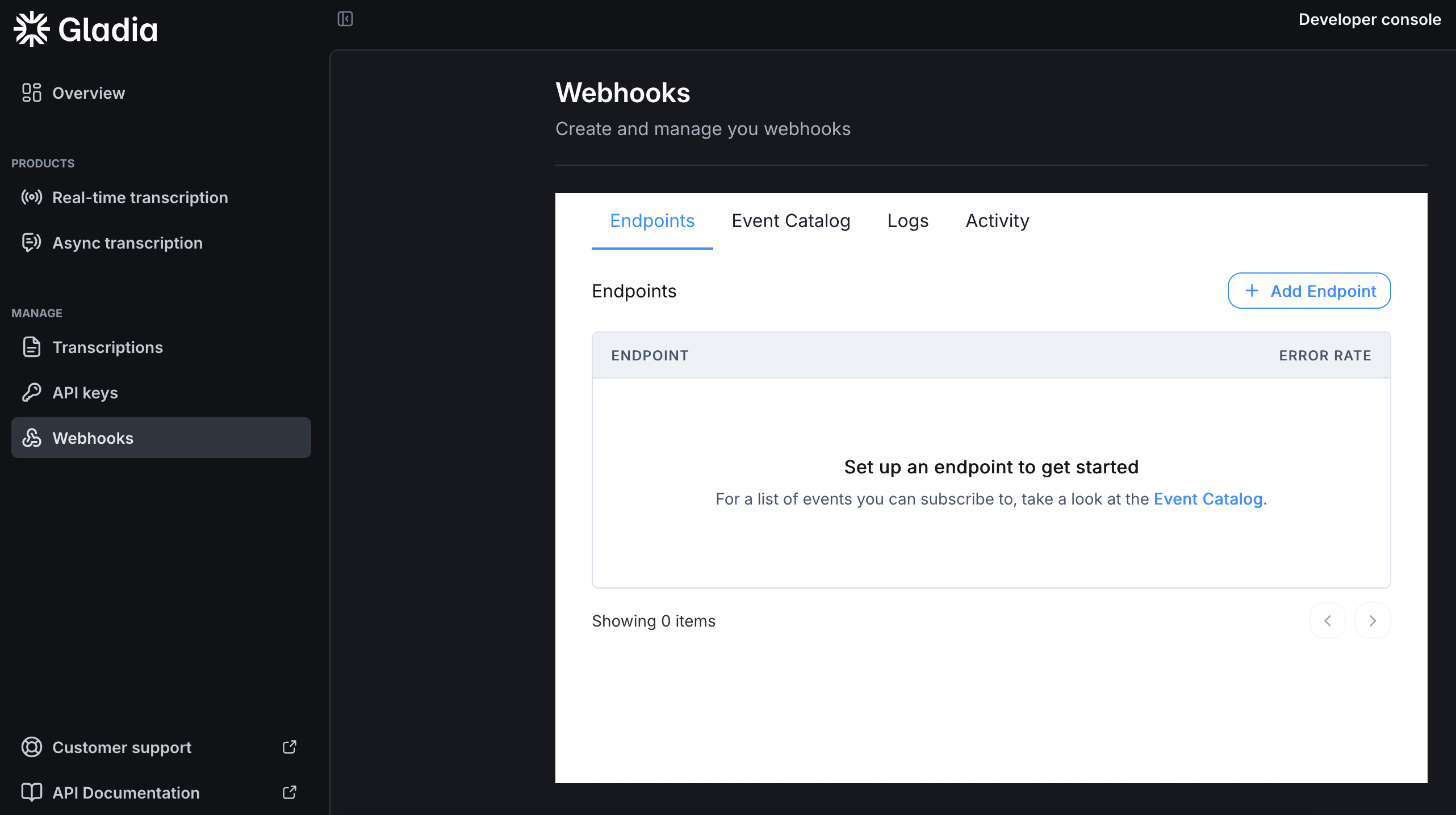 Once a transcription is done, a `POST` request will be made to the endpoint you configured. The request body is a JSON object containing the transcription `id` that you can use to retrieve your result with [our API](/api-reference/v2/pre-recorded/get).\
For the full body definition, check [our API definition](/api-reference/v2/pre-recorded/webhook/success).
Callback are HTTP calls that you can use to get notified when your transcripts are ready.
Instead of polling and keeping your server busy and maintaining work, you can use the `callback` feature to receive the result to a specified endpoint:
```json theme={"system"}
{
"audio_url": "YOUR_AUDIO_URL",
"callback": true,
"callback_config": {
"url": "https://yourserverurl.com/your/callback/endpoint/",
"method": "POST"
}
}
```
Once the transcription is done, a request will be made to the url you provided in `callback_config.url` using the HTTP method you provided in `callback_config.method`.
Allowed methods are `POST` and `PUT` with the default being `POST`.
The request body is a JSON object containing the transcription `id` and an `event` property that tells you if it's a [success](/api-reference/v2/pre-recorded/callback/success) or an [error](/api-reference/v2/pre-recorded/callback/error).
## Transcription Input & Output changes
In addition to the transcription flow changes, input & output also changed.
To get the exhaustive documentation of the **V2 input/output**, please refer to the [API Reference](/api-reference/) part of the documentation.
### Input changes
The most efficient way to get the new inputs list is to check the [API Reference](/api-reference/). But here's a quick recap table
about the most used parameters changes :
| V1 | V2 |
| -------------------- | ------------------------------------------------------ |
| `toggle_diarization` | `diarization` |
| `language_behaviour` | `detect_language`, `enable_code_switching`, `language` |
| `output_format` | `subtitles` + `subtitles_config` |
| `webhook_url` | `callback_url` |
### Output changes
Here is a general changelog for the output part of the transcription's core features:
```json V1 (deprecated) theme={"system"}
{
//"prediction" do not exist anymore, equivalent on V2 would be result.transcription.utterances
"prediction": [
{
"words": [
{
"word": "Split",
"time_begin": 0.21001999999999998, // v2 -> utterances[i].words[n].start
"time_end": 0.69015, // v2 -> utterances[i].words[n].end
"confidence": 1
},
{
"word": " infinity",
"time_begin": 0.91021,
"time_end": 1.55038,
"confidence": 0.95
},
// More words ...
],
"language": "en",
"transcription": "Split infinity in a time when less is more,", // v2 -> utterances[i].text
"confidence": 0.84,
"time_begin": 0.21001999999999998, // v2 -> utterances[i].start
"time_end": 4.71123, // v2 -> utterances[i].end
"speaker": 0, // Not present if diarization is not enabled
"channel": "channel_0" // not a string anymore but integer (channel: 0)
},
// More transcriptions...
],
// "prediction_raw" do not exist anymore
"prediction_raw": {
"metadata": { // v2-> result.metadata
// Most of those metadata are not present anymore
"audio_conversion_time": 1.0006206035614014,
"vad_time": 15.870725154876709,
"audio_preprocessing_time": 0.8548638820648193,
"language_discovery_time": 0.8840088844299316,
"inference_time": 4.302580833435059,
"translation_time": 0.0000059604644775390625,
"formatting_time": 0.00007605552673339844,
"total_transcription_time": 22.91288471221924, // -> result.metadata.transcription_time
"provided_file_metadata": {
"channels": 1, // -> result.metadata.number_of_channels
"sample_rate": 44100,
"duration": 20.555465, // -> result.metadata.audio_duration
"nb_channels": 1,
"sample_width": 1,
"number_similar_channels": 0,
"original_file_type": "audio"
},
"nb_silent_channels": -1,
"total_speech_duration": 0,
"summarization_time": 0,
"chapterization_time": 0
},
//"prediction_raw.transcription" do not exist anymore
"transcription": [
{
"words": [
{
"word": "Split",
"time_begin": 0.21001999999999998,
"time_end": 0.69015,
"confidence": 1
},
{
"word": " infinity",
"time_begin": 0.91021,
"time_end": 1.55038,
"confidence": 0.95
},
// More words ...
],
"language": "en",
"transcription": "Split infinity in a time when less is more,",
"confidence": 0.84,
"time_begin": 0.21001999999999998,
"time_end": 4.71123,
"speaker": 0,
"channel": "channel_0"
},
// More transcriptions...
]
}
}
```
```json V2 theme={"system"}
{
"id": "0777a4fc-0b7e-40fb-9d37-690bdd83c9c6",
"request_id": "G-0777a4fc",
"status": "done",
"created_at": "2024-01-03T11:11:03.872Z",
"completed_at": "2024-01-03T11:11:14.962Z",
"result": {
"metadata": {
"audio_duration": 20.555465,
"number_of_channels": 1,
"transcription_time": 11.09,
"billing_time": 20.555465
},
"transcription": {
"languages": [
"en"
],
"full_transcript": "Split infinity in a time when less is more, where too much is never enough. There is always hope for the future. The future can be read from the past. The past foreshadows the present, and the present hasn't been written yet.",
"utterances": [
{
"text": "Split infinity in a time when less is more,",
"language": "en",
"start": 0.21001999999999998,
"end": 4.71123,
"channel": 0,
"speaker": 0,
"words": [
{
"word": "Split",
"start": 0.21001999999999998,
"end": 0.69015,
"confidence": 1
},
{
"word": " infinity",
"start": 0.91021,
"end": 1.55038,
"confidence": 0.95
},
// More words ...
]
},
// More utterances of same shape...
]}
}
}
```
To dive deeper into the V2 version of the API, please take a look at those next:
* [API Reference](/api-reference/)
* [Speech Recognition](/chapters/pre-recorded-stt/features)
* [Translation model](/chapters/audio-intelligence/translation)
* [Summarization model](/chapters/audio-intelligence/summarization)
Once a transcription is done, a `POST` request will be made to the endpoint you configured. The request body is a JSON object containing the transcription `id` that you can use to retrieve your result with [our API](/api-reference/v2/pre-recorded/get).\
For the full body definition, check [our API definition](/api-reference/v2/pre-recorded/webhook/success).
Callback are HTTP calls that you can use to get notified when your transcripts are ready.
Instead of polling and keeping your server busy and maintaining work, you can use the `callback` feature to receive the result to a specified endpoint:
```json theme={"system"}
{
"audio_url": "YOUR_AUDIO_URL",
"callback": true,
"callback_config": {
"url": "https://yourserverurl.com/your/callback/endpoint/",
"method": "POST"
}
}
```
Once the transcription is done, a request will be made to the url you provided in `callback_config.url` using the HTTP method you provided in `callback_config.method`.
Allowed methods are `POST` and `PUT` with the default being `POST`.
The request body is a JSON object containing the transcription `id` and an `event` property that tells you if it's a [success](/api-reference/v2/pre-recorded/callback/success) or an [error](/api-reference/v2/pre-recorded/callback/error).
## Transcription Input & Output changes
In addition to the transcription flow changes, input & output also changed.
To get the exhaustive documentation of the **V2 input/output**, please refer to the [API Reference](/api-reference/) part of the documentation.
### Input changes
The most efficient way to get the new inputs list is to check the [API Reference](/api-reference/). But here's a quick recap table
about the most used parameters changes :
| V1 | V2 |
| -------------------- | ------------------------------------------------------ |
| `toggle_diarization` | `diarization` |
| `language_behaviour` | `detect_language`, `enable_code_switching`, `language` |
| `output_format` | `subtitles` + `subtitles_config` |
| `webhook_url` | `callback_url` |
### Output changes
Here is a general changelog for the output part of the transcription's core features:
```json V1 (deprecated) theme={"system"}
{
//"prediction" do not exist anymore, equivalent on V2 would be result.transcription.utterances
"prediction": [
{
"words": [
{
"word": "Split",
"time_begin": 0.21001999999999998, // v2 -> utterances[i].words[n].start
"time_end": 0.69015, // v2 -> utterances[i].words[n].end
"confidence": 1
},
{
"word": " infinity",
"time_begin": 0.91021,
"time_end": 1.55038,
"confidence": 0.95
},
// More words ...
],
"language": "en",
"transcription": "Split infinity in a time when less is more,", // v2 -> utterances[i].text
"confidence": 0.84,
"time_begin": 0.21001999999999998, // v2 -> utterances[i].start
"time_end": 4.71123, // v2 -> utterances[i].end
"speaker": 0, // Not present if diarization is not enabled
"channel": "channel_0" // not a string anymore but integer (channel: 0)
},
// More transcriptions...
],
// "prediction_raw" do not exist anymore
"prediction_raw": {
"metadata": { // v2-> result.metadata
// Most of those metadata are not present anymore
"audio_conversion_time": 1.0006206035614014,
"vad_time": 15.870725154876709,
"audio_preprocessing_time": 0.8548638820648193,
"language_discovery_time": 0.8840088844299316,
"inference_time": 4.302580833435059,
"translation_time": 0.0000059604644775390625,
"formatting_time": 0.00007605552673339844,
"total_transcription_time": 22.91288471221924, // -> result.metadata.transcription_time
"provided_file_metadata": {
"channels": 1, // -> result.metadata.number_of_channels
"sample_rate": 44100,
"duration": 20.555465, // -> result.metadata.audio_duration
"nb_channels": 1,
"sample_width": 1,
"number_similar_channels": 0,
"original_file_type": "audio"
},
"nb_silent_channels": -1,
"total_speech_duration": 0,
"summarization_time": 0,
"chapterization_time": 0
},
//"prediction_raw.transcription" do not exist anymore
"transcription": [
{
"words": [
{
"word": "Split",
"time_begin": 0.21001999999999998,
"time_end": 0.69015,
"confidence": 1
},
{
"word": " infinity",
"time_begin": 0.91021,
"time_end": 1.55038,
"confidence": 0.95
},
// More words ...
],
"language": "en",
"transcription": "Split infinity in a time when less is more,",
"confidence": 0.84,
"time_begin": 0.21001999999999998,
"time_end": 4.71123,
"speaker": 0,
"channel": "channel_0"
},
// More transcriptions...
]
}
}
```
```json V2 theme={"system"}
{
"id": "0777a4fc-0b7e-40fb-9d37-690bdd83c9c6",
"request_id": "G-0777a4fc",
"status": "done",
"created_at": "2024-01-03T11:11:03.872Z",
"completed_at": "2024-01-03T11:11:14.962Z",
"result": {
"metadata": {
"audio_duration": 20.555465,
"number_of_channels": 1,
"transcription_time": 11.09,
"billing_time": 20.555465
},
"transcription": {
"languages": [
"en"
],
"full_transcript": "Split infinity in a time when less is more, where too much is never enough. There is always hope for the future. The future can be read from the past. The past foreshadows the present, and the present hasn't been written yet.",
"utterances": [
{
"text": "Split infinity in a time when less is more,",
"language": "en",
"start": 0.21001999999999998,
"end": 4.71123,
"channel": 0,
"speaker": 0,
"words": [
{
"word": "Split",
"start": 0.21001999999999998,
"end": 0.69015,
"confidence": 1
},
{
"word": " infinity",
"start": 0.91021,
"end": 1.55038,
"confidence": 0.95
},
// More words ...
]
},
// More utterances of same shape...
]}
}
}
```
To dive deeper into the V2 version of the API, please take a look at those next:
* [API Reference](/api-reference/)
* [Speech Recognition](/chapters/pre-recorded-stt/features)
* [Translation model](/chapters/audio-intelligence/translation)
* [Summarization model](/chapters/audio-intelligence/summarization)